About the Native Plants Directory
I'm a web designer by trade that has been actively engaging native plants and ecological landscaping in my life for the past 15 years. This website is a passion project for me to help add to the native plant movement and help grow the native plant industry in terms of economies of scale. This website strives to make it easier for consumers to educate themselves and purchase or aquire native plants from native plant retailers and growers in their area.
Add your Native Plant Nursery, Grower, Supplier or Landscaper Business to the Directory
List your business or organization on the NativePlants.Directory for free and connect with new customers who care about local ecosystems. This is a human edited directory to ensure it is free of bogus listing information.
There is no fee to participate in this directory as a native plant business or organization!

Reasons to Include Your Native Plant Business in our Directory
Light Up your State with your Business Information
When a new native plant nursery, native plant landscaper or native plant grower is added to a state the color will change and link to businesses and organizations in that state.
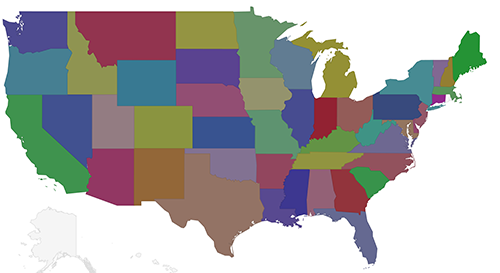
Increase Your Online Reach
Add your native plant business to our directory and help more people discover sustainable, eco-friendly landscaping options on a nationwide perspective.
Benefit-Driven Community Focused
As native plant awareness continues to expand get discovered by homeowners, landscapers, and pollinator advocates.
Edit and Modify Your Own Listing
Sign up and manage your business listing including photos, product inventory uploads and more.
Upload Your Own Images and Inventory Lists
You control your own information. Add up to 10 photos and change them out at anytime. You are in control! Change as often as you like. Upload your inventory PDFs or documents.
View the Website Traffic to your listing on the website
Your listing on the directory will show you the traffic you are receiving from the directory.
How to add a public listing to the directory
Step 1:
Click on the "Login Button" below
Step 2:
After Logging into the site visit the menu at the top of the page. Click on the "Add Public Listing" Menu Item.
Step 3:
Enter your information, photos and inventory uploads into the webpage and hit submit.
Step 4:
Your listing will be reviewed and published to the directory.
How to edit your listing on the directory (Do it as often as you like).
Step 1:
Click on the "Login Button" below
Step 2:
After logging into the site, visit the menu at the top of this page. and click on "My Public Listing"
Step 3:
View and make changes to your public listing
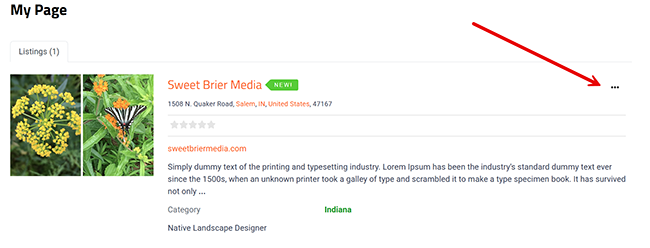
Step 4:
Click on the submit button at the bottom to submit your listing changes.
Need some help?